Your experts set the standard. AI holds every shift to it.

skillia.AI captures your experts' work on a phone or hands-free through smart glasses, checks every operator's steps with AI, and keeps your skills matrix current on its own.

Five free AI work instructions, no credit card. Or talk to us about a plant-wide rollout.

HOW IT WORKS
The problem

Your skills matrix is a list of signatures.

It tells you who was trained. It can't tell you who can do the job on their own, on a real shift, today.

A signature isn't a skill

A sign-off records that training happened. Nobody watched the operator do the job alone, start to finish.

SOPs change. Sign-offs don't.

When a procedure is revised, nobody can tell whose sign-off just went out of date, so every checkmark stays green.

Know-how walks out the door

What your best people know lives in their hands, not in the binder. When they retire, it leaves with them.

How it works

From your best expert to every shift.

1See

Capture the expert, hands-free.

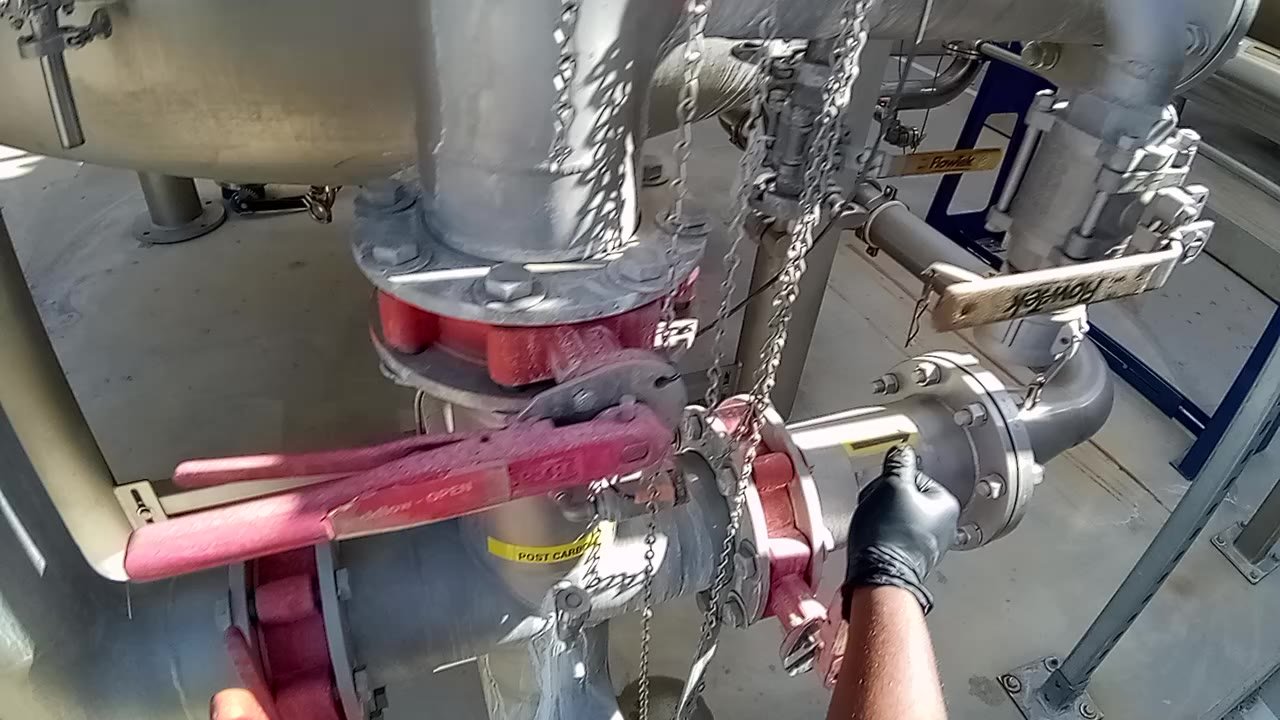
Your expert does the job once, on a phone or through smart glasses. AI turns the recording into a draft work instruction that your expert reviews and approves.

  • Numbered steps with timestamps, parts, key focus points and a frame for each step
  • Pause for waiting steps; the segments are stitched into one procedure
  • Already have SOPs? Import the PDFs as editable, versioned documents
All plans · Smart glasses on Enterprise
First-person view of a gloved hand closing a pipe valve during a plant procedure
STEP 0100:00:13AI draft · awaiting expert approval

Close the forward flow valve by turning the handle perpendicular to the pipe.

Key focus Confirm the handle is fully perpendicular before starting the next step.

2Guide

Train with your expert's exact words.

In a training session the voice guide reads your approved steps, word for word. Operators keep their hands on the job and say "next", "back" or "repeat".

  • Nothing is recorded and nothing is scored while they learn
  • The guide never improvises a step; it only reads what your expert approved
Enterprise · Available on mobile devices
3Check

AI checks every step, on every shift.

The operator records their own attempt. AI compares it with the approved work instruction, step by step, and keeps a timestamp and notes for each one.

  • A score out of 10, steps completed, strengths and what to improve
  • Missed steps are flagged; waiting steps never count against anyone
  • Recordings can pause and resume for long jobs
Team plan and up
AI assessment report: overall score 10 out of 10 and a step-by-step analysis with a score, status and timestamp for each step
4Know

A skills matrix that keeps itself current.

Every result updates the matrix, by work instruction and by process. Every checkmark opens the evidence behind it.

  • Proof expires on your schedule, with reminders before it does
  • When an SOP changes, Change Impact shows whose sign-off it affects; you decide who is reassessed
  • Reviewers sign off results, and nobody approves their own work
Business plan and up
Skills matrix: operators by work instruction, with verified, due, expired and flagged cells and the score behind each
Proof, not promises

Every checkmark, backed by video. Click one.

Five real AI assessments from our public demos. Verified means a score of 8 or more and no missed step, so a high score alone doesn't earn the checkmark.

Work instructionResultScoreSteps observed
Olympus microscope maintenance
Medical device
10.0/10 14 of 14
Vascular stapler assembly
Medical device
9.0/10 14 of 15
Cleaning furnace burners
Field service
9.0/10 20 of 21
Sterilizer cassette maintenance
Medical device
9.0/10 12 of 14
Ball valve disassembly
Manufacturing
7.0/10 20 of 27

Demo assessments of volunteer trainees. Click any result for the step-by-step evidence.

AI on the shop floor

Experts set it. AI holds it. People decide.

AI checks every step against your approved SOP, and your people make the call.

Experts set it

Your best people record the job and approve every step. That approved version is the only standard anyone trains or is checked against.

AI holds it

Every attempt is checked the same way, step by step, on every shift and at every site. No more depending on who happened to be supervising.

People decide

Reviewers sign off results. Admins decide who is reassessed when an SOP changes. Proof only expires on the schedule you set.

Change Impact: a new version of an SOP changed one step, and 14 verified operators are listed with a re-assess decision for each
An SOP changed one step. skillia.AI lists whose sign-off it affects; your admin decides who is reassessed.
SOP management

Your SOP library, current at last.

One active version of every procedure, a full revision history, and links that always open the current version.

See SOP management

Import your PDFs

Existing SOPs come in as editable, versioned documents.

One active version

New versions go through review; the old one stays in the history.

Share by link or QR

Printed QR codes on the line always open the current version.

Export to Word or PDF

A complete, formatted SOP whenever an auditor or customer asks.

Enterprise

Built for more than one plant.

Run every site in one account, with the controls your IT team expects.

Explore Enterprise

Sites and site managers

Each plant manager sees and acts on their own site's people only.

Microsoft sign-in

Single sign-on with your work accounts; leavers lose access when IT removes them.

Cross-site variance

Compare how consistently each site performs the same procedure.

Smart glasses and voice

Hands-free capture and voice-guided training sessions.

Cross-site variance: one of three plants capable, with each plant's operators, trials, failing SOPs and status
Cross-site variance across three plants.
Pricing

Start free. Pay as you prove.

Admins and reviewers are free on every paid plan; you pay for operators who are assessed.

Free$05 AI work instructions, sharing by link, 1 user.
Team$299.99/moUp to 10 operators, AI assessments.
EnterpriseFrom $1,500/moMultiple sites, Microsoft sign-in, smart glasses and voice.

Questions buyers ask

Any recent smartphone or tablet with the skillia.AI app, or a webcam for stationary tasks. For hands-free, first-person capture, smart glasses pair with the app and add voice-guided training sessions. Smart glasses and the voice guide are part of the Enterprise plan. No AR headsets or fixed camera installations.
An operator is verified on a work instruction when their recorded attempt scores at least your passing score (8 out of 10 by default) and no step was missed. Each result keeps the evidence: the clip, a timestamp per step and the AI's notes. Reviewers can sign off before a result counts, and nobody can approve their own work.
Publishing a new version never wipes out anyone's proof. Change Impact compares the versions step by step and lists whose sign-offs the change affects. You decide, person by person, who is reassessed and who keeps their status.
Your expert approves every work instruction before anyone trains on it. During a training session the voice guide reads the approved steps word for word; it never improvises instructions.
Five AI-generated work instructions, sharing by link, and one user, with no credit card. AI assessments and the skills matrix start on the paid plans.
Every organization's data is kept separate, video is encrypted at rest and in transit, and videos are served through time-limited links. Enterprise customers can sign in with their Microsoft work accounts, and people removed by IT lose access automatically.

See your first work instruction today.

Record one job, and AI drafts the work instruction for your expert to approve.